Portfolio

DEVELOPMENT TOOL: Articulate Storyline - eLearning Module
This interactive Articulate Storyline lesson places military personnel in a realistic operational scenario where they must apply their knowledge and decision-making skills to a developing situation.
After learning about the operation, learners watch a video that helps them formulate their response. Following the video, learners determine how they would handle the situation based on their training, knowledge, and military procedures.
After submitting their responses, learners are presented with the correct responses and can compare their decisions to the expected course of action. This approach encourages critical thinking, reinforces operational knowledge, and allows learners to identify gaps between their initial response and the established best practices.
The lesson uses scenario-based learning, video, learner interaction, and immediate feedback to create an engaging experience that helps military personnel practice applying knowledge to realistic operational situations.

DEVELOPMENT TOOL: Microsoft Word - Course Design Document
The Instructional Media Design Package (IMDP) serves as the comprehensive blueprint for the design, development, and delivery of the Principles of Military Preventive Medicine Distance Learning (DL) Phase I (6A-F5 Phase I DL) course. It establishes the instructional and technical framework that will guide the transformation of existing course materials into an engaging, interactive, multimedia-rich eLearning experience.
The IMDP defines what will be taught, how it will be taught, how learners will interact with the content, and how the course will function within the learning environment. It documents the course structure, learning objectives, instructional strategies, lesson design methods, assessments, courseware architecture, user-interface requirements, multimedia components, and technical specifications needed to develop the course.
The document also provides a common reference point for instructional designers, subject-matter experts, developers, reviewers, and other stakeholders involved in the course development process. By establishing these requirements and design standards before development begins, the IMDP promotes consistency, alignment between instruction and learning objectives, usability, accessibility, and effective implementation of the final courseware.
Ultimately, the IMDP is intended to ensure that the course design provides AMEDD officers with an effective learning experience that builds the foundational knowledge and skills needed to function as entry-level members of a multidisciplinary preventive medicine team. The design emphasizes learner-centered instruction, multimedia, simulations, scenario-based learning, and opportunities for learners to apply knowledge to realistic situations.
_Page_001.jpg)
DEVELOPMENT TOOL: LeaderGuide Pro - Instructor Guide
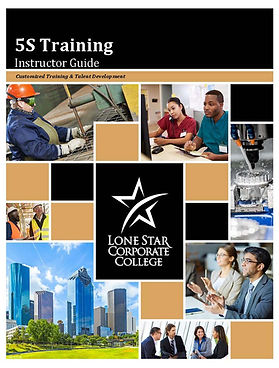
This document is specifically designed as an Instructor Guide for delivering the 5S Training course. The course focuses on helping participants understand how 5S can be used to eliminate waste, improve workplace organization, increase efficiency, and create safer, more effective work environments. It serves as the instructor's primary reference for preparing for and facilitating the class.
The guide provides the instructor with a complete delivery framework, including:
-
Course and module objectives
-
Recommended instructional sequence
-
Estimated instructional times
-
Required materials, equipment, and supplies
-
PowerPoint presentation guidance
-
Instructor scripts and talking points
-
Key concepts and points to emphasize
-
Directions for activities, games, and exercises
-
Handouts and supporting materials
-
Assessment instructions and answer keys
-
Videos and demonstrations
-
Questions and discussion prompts
-
Guidance for conducting the 5S implementation activities
-
The guide uses graphic cues and instructor notes throughout the course to clearly indicate what the instructor should say, demonstrate, ask, project, distribute, or have participants complete. This makes the guide a step-by-step facilitation resource that helps ensure consistent delivery of the training.
The course combines instruction, discussion, multimedia, practical exercises, assessments, and hands-on application rather than relying solely on lecture. Participants are given opportunities to identify waste, discuss workplace applications, participate in the 5S Game, examine implementation strategies, and work with tools that can be used to support an actual 5S improvement effort.

Click Image to Magnify

Click Image to Magnify
DEVELOPMENT TOOL: PowerPoint - Animated Graphics
PowerPoint can be used for much more than creating static presentation slides. With the right combination of shapes, graphics, animation effects, motion paths, and timing, PowerPoint can be used to create engaging animated visuals.
I started by building the individual elements of the graphic directly on a PowerPoint slide. Each component was created or inserted as a separate object so that I could control how and when it appeared, moved, changed, or disappeared.
Then I used PowerPoint's animations features to bring the tomato and bumble bee to life. By combining entrance, emphasis, exit, and motion-path animations—and adjusting the duration, delay, and sequencing of each animation—I was able to create the desired movement and visual effects.
This demonstrates that you don't necessarily need specialized animation software to
create effective animated learning graphics. PowerPoint itself provides many of the tools needed to create professional-looking animations.
The key is to think of the PowerPoint slide as a canvas and each individual object as an element that can be animated. Once you understand how to separate the graphic into individual components and control their timing, PowerPoint becomes a surprisingly powerful tool for creating animated instructional content.
The Process at a Glance:
-
Build the graphic – Create the individual shapes, text, icons, and visual elements in PowerPoint.
-
Separate the elements – Keep objects independent so each one can be animated individually.
-
Apply animations – Use PowerPoint's animation effects and motion paths to create movement.
-
Control timing – Use the animation pane to sequence the animations and adjust duration and delays.
-
Combine the effects – Coordinate the animations so the individual elements work together as a single visual.
-
Preview and refine – Play the animation repeatedly and adjust timing, movement, and transitions until the desired result is achieved.
The important takeaway is that animated graphics are possible in PowerPoint. With creativity and an understanding of PowerPoint's animation tools, instructional designers can create dynamic visuals without having to move into more complex animation applications.

DEVELOPMENT TOOL: Articulate Storyline - eLearning Module
This Articulate Storyline module provides an interactive introduction to vector-borne diseases and the role of entomologists play in identifying and investigating disease threats among military personnel. Designed as a scenario-based learning experience, the module immerses participants in a realistic operational environment where they must begin identifying potential vector-borne disease concerns and the investigative steps used to determine their causes.
The module primarily uses video to establish the scenario and introduce MAJ Dalton McCormick, a key character who provides context about the operational environment. Participants learn where MAJ McCormick is located, understand the current vector-borne disease situation affecting troops in the area, and begin considering the factors that may contribute to disease transmission.
Through the storyline and supporting media, participants are introduced to the process entomologists use to recognize potential vector-borne diseases, assess the situation, and identify the appropriate steps for determining the underlying causes.
The module serves as an engaging introduction that connects entomological knowledge to real-world military operations and prepares participants for more detailed instruction and decision-making later in the course.